 PotScout
Find the best clipping campaign in one click.
The biggest pot is not the best pot. The best pot still pays when your clip goes up. PotScout puts $ per clipper, days left and the country rule right on every campaign card — then tracks what each of your clips earns. No account.
No account48h PRO on usPay once, no quota
Clipping pays. Picking the campaign doesn't.
campaigns on one endless page
Whop lists them all, and the card tells you almost nothing about the pot behind it. Rate, budget, how many clippers are already feeding on it: hidden until you open each one.
until a good pot is empty
The best campaigns drain before your clip is even reviewed. You find out after the edit, when the payout says zero.
of opening tabs
Comparing rates and budgets by hand is a second job that pays nothing. Twice a week, from the top.
Most pots are thinner than they look.
A $50,000 budget shared by 900 clippers is $55 each. PotScout does this maths for every campaign, every day. Here is today's picture.
$ left per clipper, all campaigns
Budget left ÷ clippers already in. Updated daily from the public campaign list.
pots will be empty within 7 days at their current burn rate. Clip one of those and your views may never be paid.
See this week's dying pots →Three clicks, then you only see pots worth clipping.
Open Whop Content Rewards
The public campaign page you already use. No login needed for PotScout.
Read the cards
$ per clipper and days left appear on every campaign card the moment the page loads. Click Best value in Whop's own sort bar and the whole list ranks itself.
Set your bar
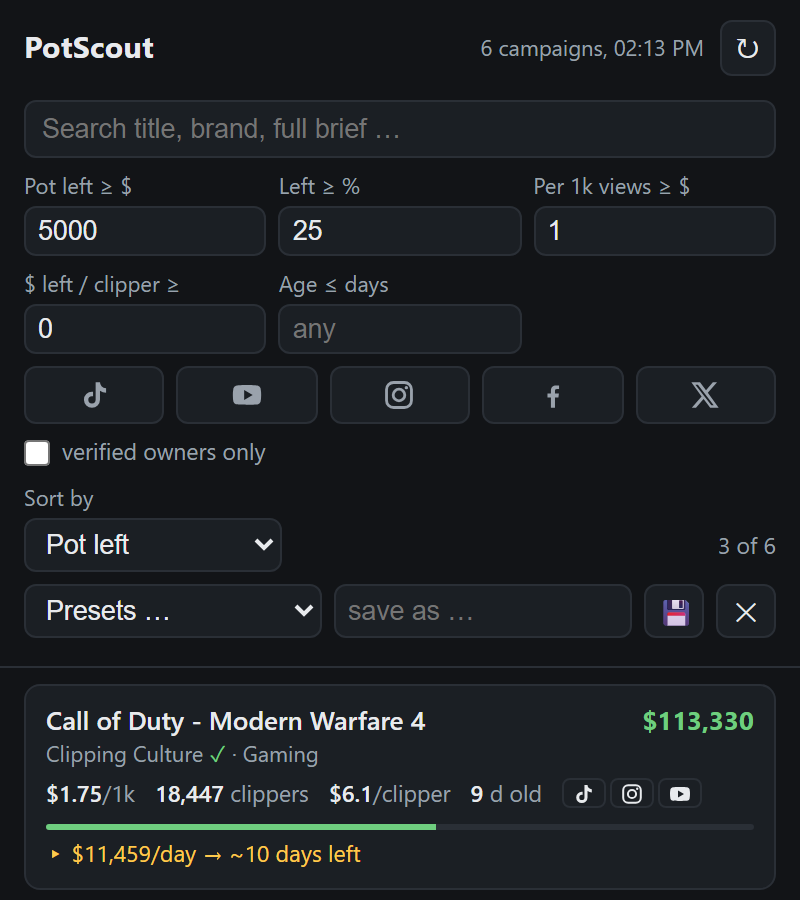
Open the side panel: pot left, $ per 1k, $ per clipper, age, platform. Everything below the bar stays visible, greyed out, with the reason.
The numbers nobody else shows you.
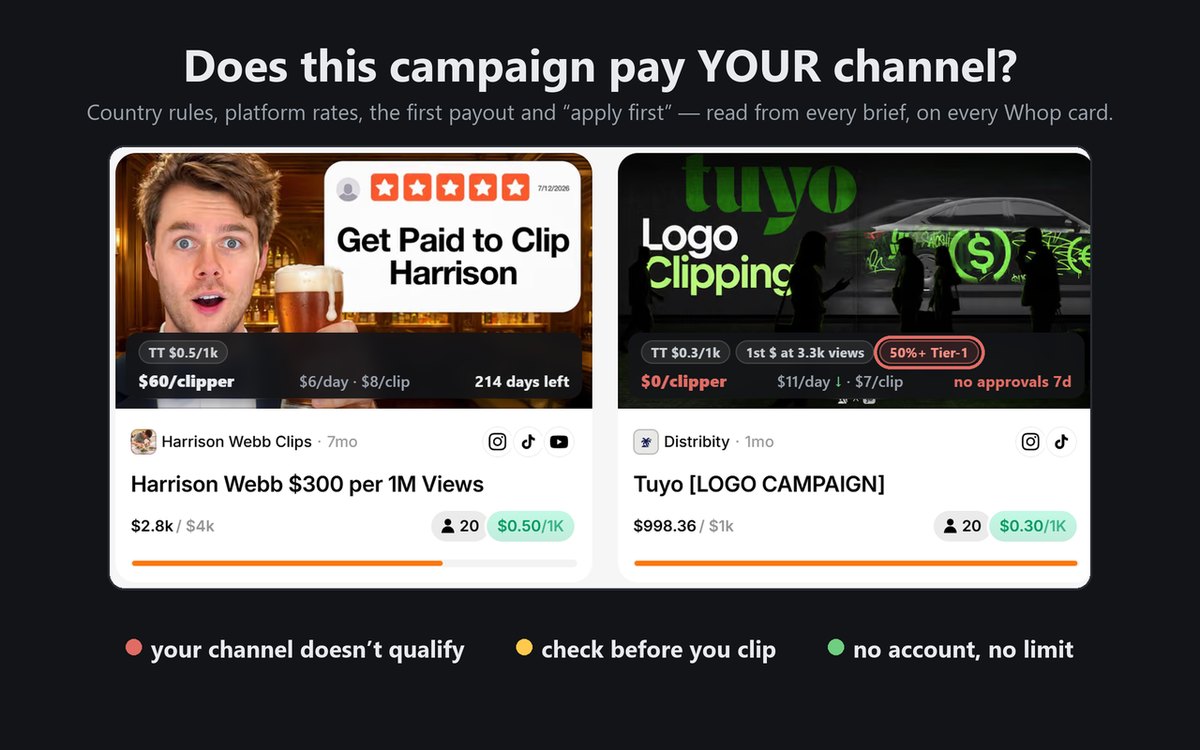
Does this campaign pay YOUR channel?
The rules sit in a Google Doc three clicks deep: "40% of your audience must be from the US, UK, Canada or Australia", or "$1 per 1k" that only applies to Instagram. PotScout reads them for you and puts them on the card: the country rule, the rate for each platform, and the views you need for your first dollar. Enter your own Tier-1 share once and every campaign you would not get paid for turns red. "Apply first" is flagged too, and one panel filter hides those campaigns.
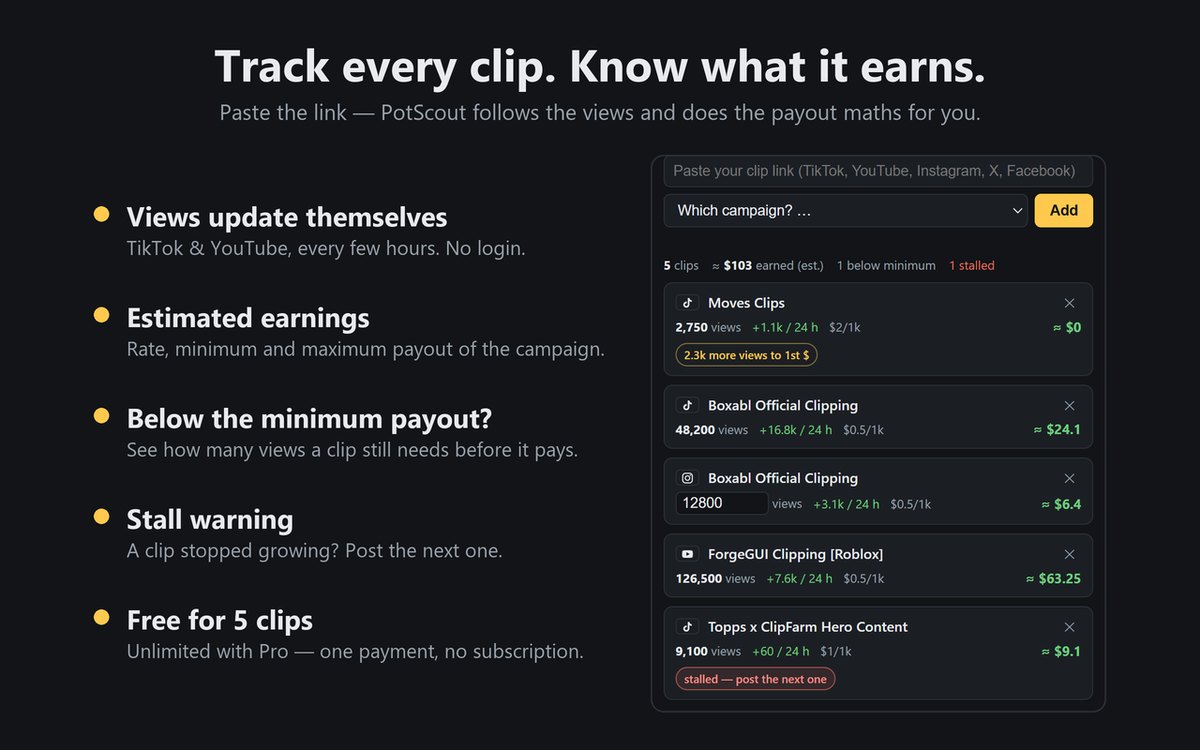
Track every clip. Know what it earns.
Paste the link of a clip you posted and pick the campaign. TikTok and YouTube views update by themselves every few hours; for Instagram, X and Facebook you type them in. PotScout does the payout maths with the campaign's rate, minimum and maximum. A clip below the minimum shows how many views it still needs. A clip that stopped growing gets a warning, so you post the next one instead of waiting. Pro tracks unlimited clips.
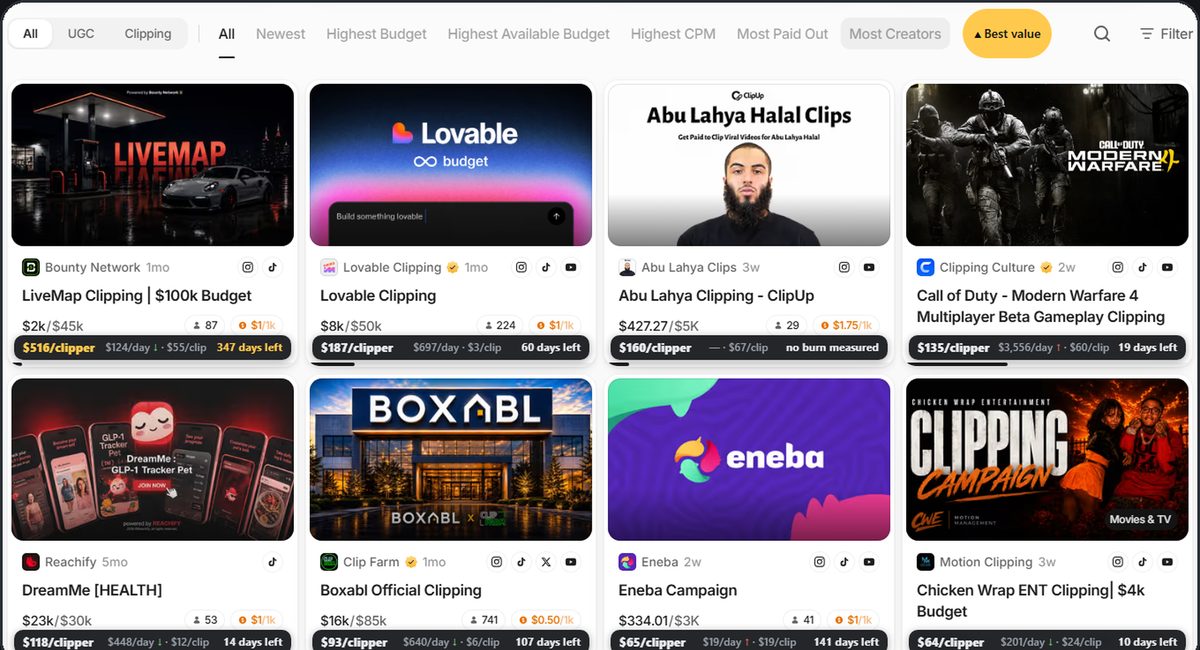
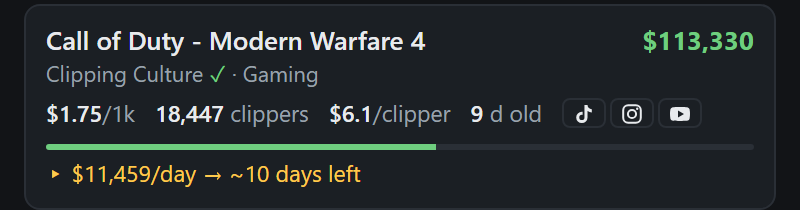
The numbers right on every Whop card
$ left per clipper and days left sit on the card itself, so you compare 600 campaigns by scrolling, not by opening them one by one. Pro adds burn per day with trend and $ per approved clip to the same strip.

Best value, one click, on Whop itself
A button in Whop's own sort bar ranks the whole list by $ left per clipper. Pots dying this week and pots that stopped approving clips go last, whatever their budget says.
Burn rate, tipping pots and stalled approvals
PotScout measures every budget twice a day: how fast the pot drains, how many days are left, and whether the drain doubled since yesterday. It also watches how many clips each campaign actually approves. A pot that stopped approving days ago is dead, however full it looks. Pro shows $ per approved clip and warns you before you edit.
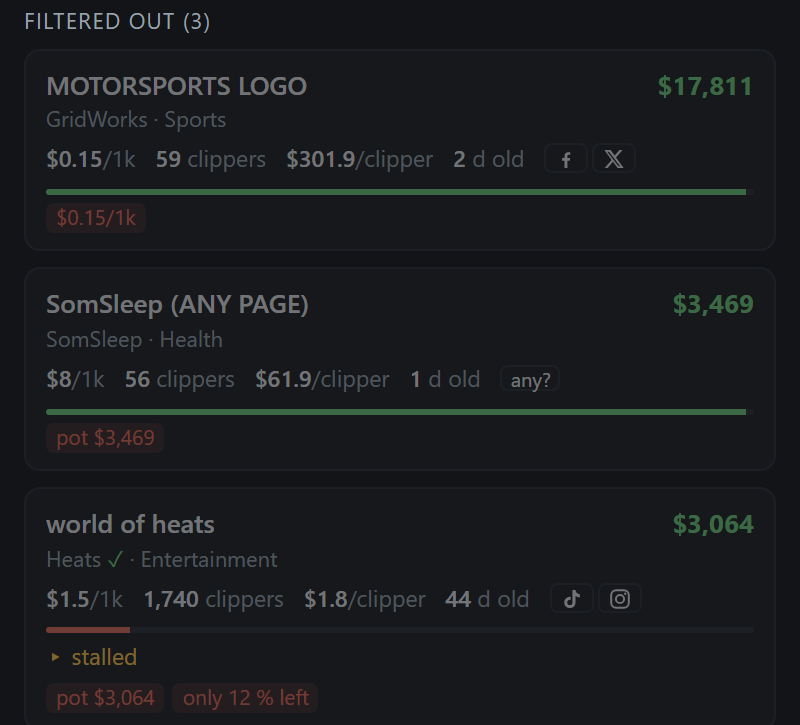
No black-box filtering
Campaigns that miss your limits don't vanish. They stay visible, greyed out, with the exact failing number as a tag. You see why something dropped, and you can loosen one limit instead of guessing.
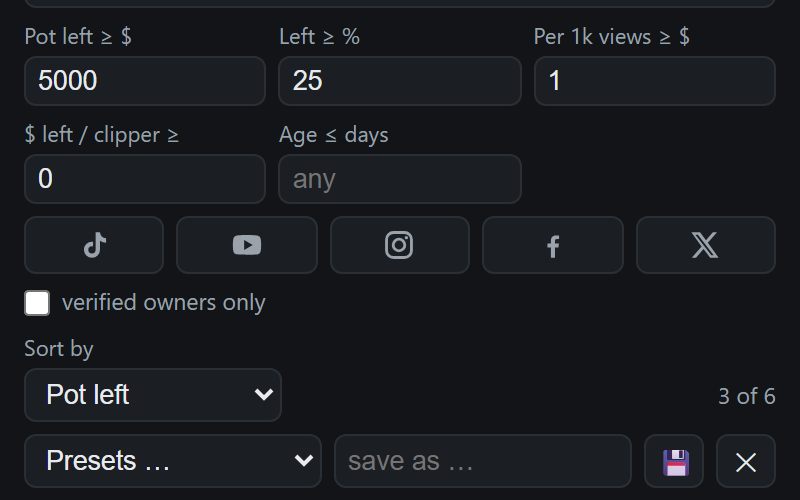
Set your bar in dollars, not percent
Pot left in $, not just "paid out %". Minimum $ per 1k views. $ left per clipper, so you see how thin a pot is really spread. Plus platform, campaign age, verified owners and your own channel, all on one screen.
The numbers on every card, then one click.
Free forever. Pro when you are serious.
Free
- $ per clipper, days left and NEW on every Whop card
- Unlimited filter runs in the side panel
- Campaign rules on the card: country rule, rate per platform, first payout, apply first
- Clip tracker for 5 clips
- Pot left in $, % left, $ per 1k views, $ per clipper
- Platforms, campaign age, verified owners, your channel
- Filtered-out list with reasons
- Burn per day, trend, $ per approved clip
- Best value sort, tipping and stall warnings
- Unlimited clip tracking
- Full-text search, saved presets
Pro
- Everything in Free
- Burn per day and trend on every card
- $ per approved clip and stalled-approval warnings
- Best value sort button on Whop
- Tipping and Stalled panels: what changed since yesterday
- Unlimited clip tracking
- Full-text search inside briefs, saved presets
- License key on your receipt, activates in seconds
- All updates included
48h PRO on us: everything unlocked for your first two days, then decide. Other campaign tools charge a monthly fee or sell filter runs in quotas. PotScout is one payment, then it's yours.
Before you install.
Do I need an account or a login?
No. PotScout reads the public campaign list. No login, no account, no e-mail. Your filters and license key stay in your browser; potscout.com sets one random cookie so it knows when your 48-hour trial started.
Is it really pay-once?
Yes. $19.99 once, license key forever, works across your own browsers. There is no quota of filter runs and nothing renews.
Where do the campaign rules come from?
From each campaign's own brief and the rules document it links to. potscout.com reads them and publishes the result in the same small public data file as the budgets, so the tags show up on the card without you opening anything.
How does the clip tracker get my views? Does it need my login?
No login. For TikTok and YouTube it reads the public view count of the clip link you added, every few hours. The browser asks for access to tiktok.com or youtube.com only when you add your first clip from that site. Instagram, X and Facebook views you type in yourself. Your clips and your channel profile stay in your browser; nothing about them is sent to potscout.com.
What happens when Whop changes the campaigns page?
PotScout re-learns the page after Whop deploys. If the format changes in a way it cannot read, it shows a clear read error instead of silently wrong numbers, and gets updated. Updates are included.
Where does the burn-rate data come from?
Two sources. potscout.com measures every campaign budget and its approved clips twice a day and publishes the result, so the card numbers work from the first minute. Your own extension also snapshots the budgets locally, so the figures keep up between updates.
What is 48h PRO?
Every new PotScout user gets the full Pro data for 48 hours: burn and trend, $ per approved clip, the Best value sort, tipping and stall warnings, unlimited clip tracking. After that the cards keep $ per clipper and days left for free; Pro is one payment if you want the rest back.
Which browsers?
Google Chrome, and Chromium browsers that can install from the Chrome Web Store, such as Edge and Brave.
Is PotScout affiliated with Whop?
No. PotScout is an independent tool and reads only what is publicly visible on the campaign page.
Find the best campaign in one click.
Install the free extension, read the numbers and the rules on the cards, and skip the pots that die or will not pay your channel.